
Quickly Overview all Business Activities In Websol Muhasib ERP
Websol Muhasib ERP allows you to view your daily/weekly/monthly sales (work period-wise), active orders, billing insights, and trending items. Bawarchi POS offers you advanced Business Analytics (BA) and Business Intelligence (BI) tools to find out trending items and customers.
Review Dashboard
To review your dashboard reports follow the steps
Step 1. Log in to the Websol Muhasib ERP and access the Main Back Office user interface.
Step 2. On the appeared screen, click "Dashboards and BI".
Step 3. Click on the option "Company Dashboard" on Dashboards and BI interface.
See the pictures below with labels. Each section is marked with labels that are further explained in detail.
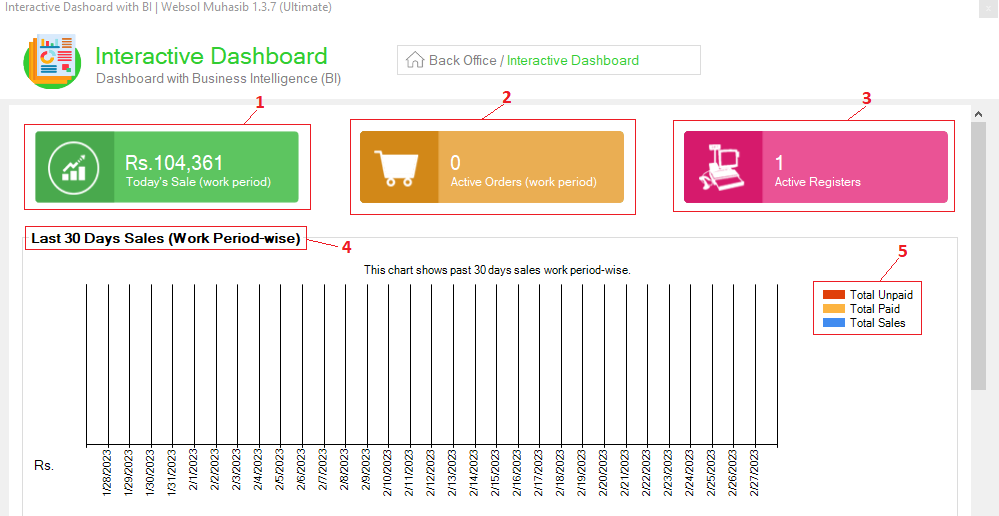
1. The "Today's Sale(work period)" shows working period-wise (shift-wise) sales.
2. The "Active Orders (work period)" shows all the active orders of today (working period-wise).
3. The "Active Register" shows how many registers are currently active in your software to record your sales.
4. The "Last 30 Days Sales(work period-wise)" panel shows you the chart of the reports of your performing sales for the last 30 days.
5. These colors represent the segregation of data in the chart. The Red color represents unpaid sales, the yellow color represents paid sales and the blue color represents total sales performed".
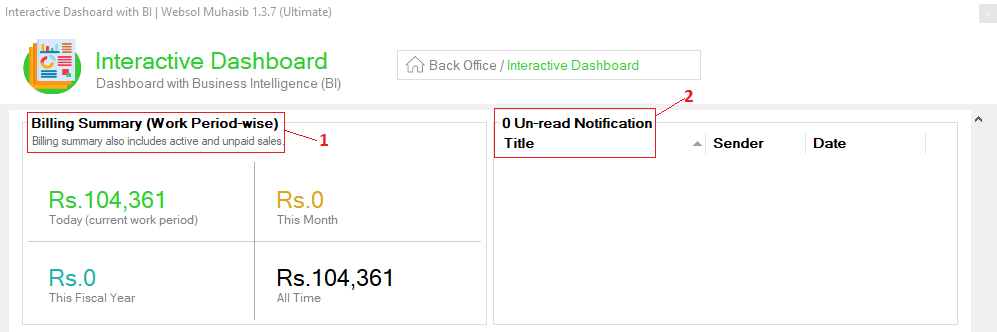
1. The "Billing Summary(Work Period-wise)" panel shows a chart of a summary of sales (segment/period-wise).
2. The "Un-read Notification Title" panel shows unread/new alerts and notifications generated by the system (like stock alert notifications, and overdue notifications).
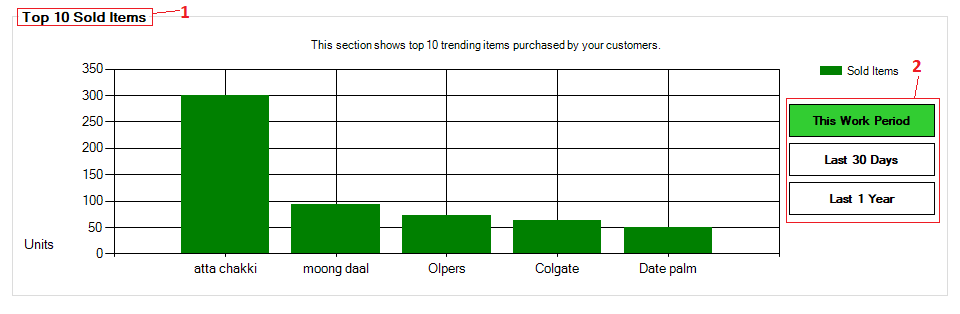
1. The "Top 10 Sold Items" panel shows you the trending items of your Company
2. Filter out trending item report segment-wise: This Work Period, Last 30 Days, Last 1 Year.
CALL US NOW!
+92 311 052 0111 | +92 21 3722 1800
PRODUCT DETAILS
https://www.pointofsale.pk/products/muhasib/
Popular Searches for Company Dashboard on Sale in Websol Muhasib ERP
- Muhasib ERP with dashboard in Pakistan.
- Muhasib ERP with trending reports
- Muhasib ERP with company overall reports
- ERP software active register report
- ERP software sales report
- How to see sales reports in Muhasib ERP?
- How to view the billing summary of Muhasib ERP?
- How to view top/least sales in Muhasib ERP?
- How to view notifications in Muhasib ERP
- Business analytics in Muhasib ERP.
- Business insights in Muhasib ERP.
- Reports of sales in business Muhasib ERP.
- ERP Software in Lahore, Karachi, Islamabad, Peshawar, Quetta, and all over Pakistan with Interactive Sale screens and customers.
- Websol Muhasib ERP is an All-in-One, One-window business management software solution in Karachi, Lahore, Islamabad, and all over Pakistan.
- Which is the best All-in-One, One-window business management software solution in Pakistan? Websol Muhasib ERP
- Muhasib ERP: Best all-in-one business software solution System.
- Muhasib ERP vs Business management solutions.
- Business ERP Karachi: Muhasib ERP.
- Business ERP Lahore: Muhasib ERP.
- Business ERP Islamabad: Muhasib ERP.
- Muhasib ERP with sales management systems.
- Muhasib ERP with integrated inventory management System.
- Muhasib ERP business running Software System.
- Muhasib ERP POS with purchase Management in business.
- Sales order ticket in Muhasib ERP.
- Business Management Software Pakistan
#websol #websoltechnologies #websolerp #muhasiberp #businesserp #businesssoftware #possoftware #cashregister #businessmanagement #erppos #crmsystem #possystem #billingapp #billingsoftware #fbrpos #srbpos #erpsolutions #accountingsoftware #accountingsolutions #erpsolutions #erpaccounting
