
Create Users and User Groups in Websol Muhasib ERP
Websol Bawarchi ERP allows you to create and manage Users. Each user has their user rights and privileges. This feature allows business owners to assign new terminals to new users. This will help business owners to manage their users.
vid
Adding New User
Following are the steps to create a new user
Step 1. Log in to the system and access the Main Back Office user interface.
Step 2. Find the User Profile Button on the left-middle grey strip, and click on the user profile button.
Step 3. User profile windows appear on the screen, click on the User Management button.
Step 4. Look at the "Manage System Users" option on the User Management interface and click.
Step 5. A "System User" window is shown on the screen.
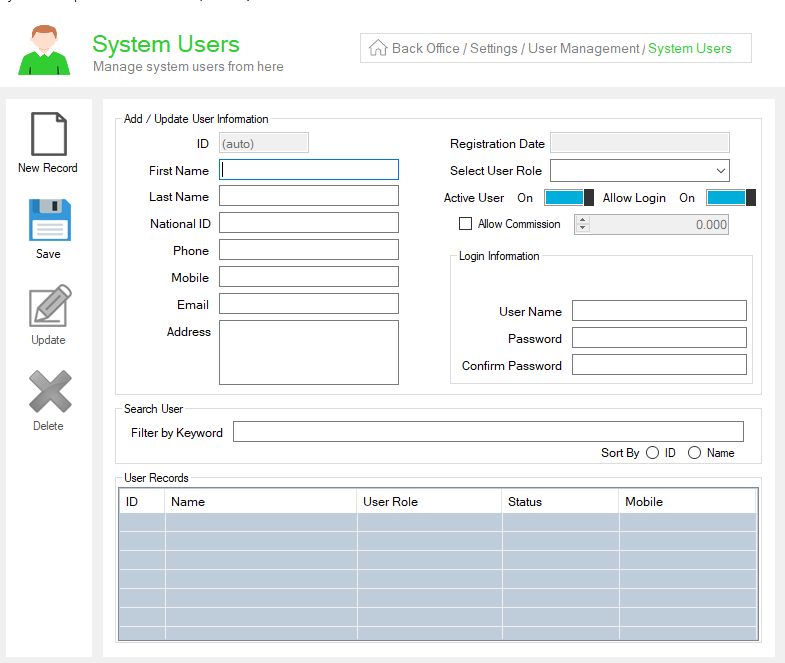
Step 6. Look at the Add/Update User Information Panel, and enter the following :
1. In the "First Name" & "Last Name" fields, Enter the name of the user.
2. In the "National ID" field, Enter the national ID of the user.
3. In the "Phone" field, Enter the user's Phone number.
4. In the "Mobile" field, Enter the user's mobile number.
5. In the "Email" field, Enter the user's email.
6. In the "Address" field, Enter the Address of the user.
7. In the "Registration Date" field, Enter the user's registration date.
8. From the "Select user Role" dropdown, select the user role
9. In the "Mobile" field, Enter the user's mobile number.
10. Enable the "Allow User" label.
11. Enable the "Allow Login" label.
12. If you want to give the commission to your user then, tick on the "Allow commission" field, and give the number.
Step 7. Look at the right "Login Information" Panel, and enter the following :
1. In the "User Name" field, enter the user name.
2. In the "Password" field, give the password.
3. In the "Confirm Password" field, confirm the entered password
Step 8. On the left, click on Save Button (message box appears "Record has been added successfully").
CALL US NOW!
+92 311 052 0111 | +92 21 3722 1800
PRODUCT DETAILS
https://www.pointofsale.pk/products/muhasib/
Popular Searches for Create a User in Websol Muhasib ERP
- Muhasib ERP with user profile settings in Pakistan.
- Muhasib ERP with user settings
- Muhasib ERP creates user settings
- ERP software settings
- ERP software user creating settings
- How to view user profile details in Muhasib ERP?
- How to create the profile of the user in Muhasib ERP?
- How to edit a user profile in Muhasib ERP?
- How to update the profile of a user in settings in Muhasib ERP
- How to create a new user in Muhasib ERP
- Business analytics in Muhasib ERP.
- Business insights in Muhasib ERP.
- Report of the user in business Muhasib ERP.
- ERP Software in Lahore, Karachi, Islamabad, Peshawar, Quetta, and all over Pakistan with Interactive Sale screens and customers.
- Websol Muhasib ERP is an All-in-One, One-window business management software solution in Karachi, Lahore, Islamabad, and all over Pakistan.
- Which is the best All-in-One, One-window business management software solution in Pakistan? Websol Muhasib ERP
- Muhasib ERP: Best all-in-one business software solution System.
- Muhasib ERP vs Business management solutions.
- Business ERP Karachi: Muhasib ERP.
- Business ERP Lahore: Muhasib ERP.
- Business ERP Islamabad: Muhasib ERP.
- Muhasib ERP with sales management systems.
- Muhasib ERP with integrated inventory management System.
- Muhasib ERP business running Software System.
- Muhasib ERP POS with purchase Management in business.
- Sales order ticket in Muhasib ERP.
- Business Management Software Pakistan
#websol #websoltechnologies #websolerp #muhasiberp #businesserp #businesssoftware #possoftware #cashregister #businessmanagement #erppos #crmsystem #possystem #billingapp #billingsoftware #fbrpos #srbpos #erpsolutions #accountingsoftware #accountingsolutions #erpsolutions #erpaccounting
