
Quick Overview Item Batch Report in Muhasib ERP
Websol Muhasib ERP allows you to view the item batch report. This was a great and advanced analytics tool provided by Websol Technologies in the Muhasib ERP software. This report shows all the batches of the items and the stock of an individual batch of the selected item in the software.
https://www.youtube.com/watch?v=yC4V62wRbz4&list=PLr15a5Cpksu0LAQ8YHEveBPEaoRIz5CIt&pp=iAQB
Item Batch Report
Follow the steps below to view the item batch report in the software.
Step 1. Log in to the system and access the Main Back Office user interface.
Step 2. On the appeared window, click "Item and Advanced Inventory".
step 3. On the appearing "Item and Inventory Management" window, the "Transactions" section is shown on your screen.
Step 4. On the tab bar, click on "Report".
Step 5. On the "Report" window, click on the "Item Batch Report"
Step 6. The "Item Batch Report" window appears on the screen.
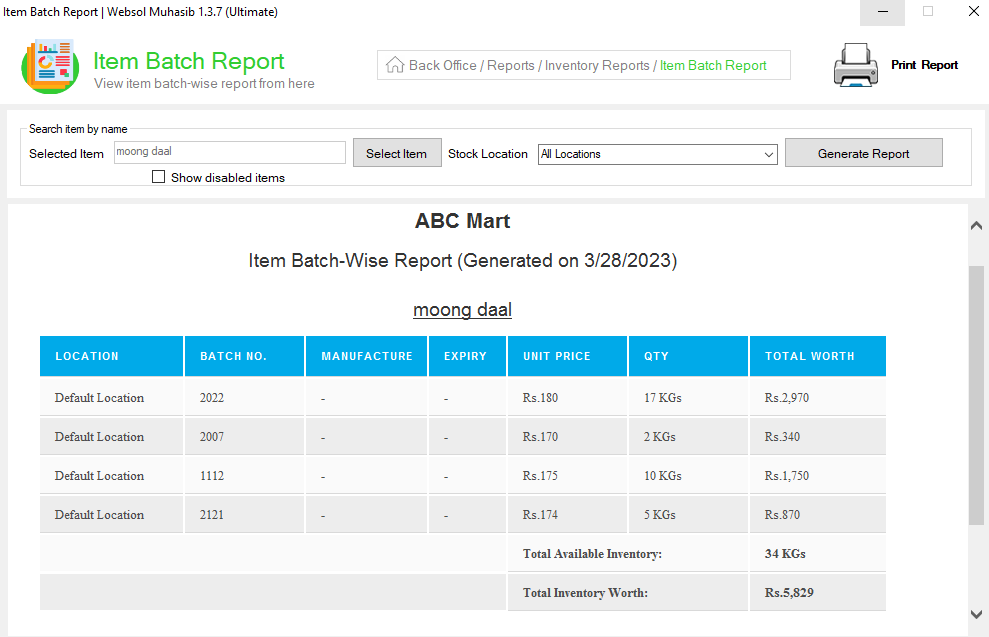
Step 7. In the "Item Batch Report" window, you have to select the item from the "Select Item" button so click on the button.
Step 8. The "Items Report" window appears on the screen, select the item and click on "View Record".
Step 9. The items batch report is shown in the "Item Batch Report" window. here user can see all the batches of items and the stock of batches.
Step 10. If you want to see the report of a single location so select the location from the "Select Location" dropdown and click on "Generate Report".
Step 11. Look at the top and click the "Print Report" button to print the report.
Step 12. Close the report.
CALL US NOW!
+92 311 052 0111 | +92 21 3722 1800
PRODUCT DETAILS
https://www.pointofsale.pk/products/muhasib/
Popular Searches for Item Batch Reports in Websol Muhasib ERP
- Muhasib ERP with Items and inventory in Pakistan.
- Muhasib ERP with the batch report.
- Muhasib ERP with the item batch report.
- ERP software reports
- ERP software items
- How to see the batch report in Muhasib ERP?
- How to view the batch-wise items stock report in Muhasib ERP?
- How to view the item stock report in Muhasib ERP?
- How to see the items that are in stock.
- How to print the item batch report in the software
- How to select the item in the item batch report in the software
- How to view the batch-wise item stock location wise
- Business analytics in Muhasib ERP.
- Business insights in Muhasib ERP.
- Reports of item batches in business Muhasib ERP.
- ERP Software in Lahore, Karachi, Islamabad, Peshawar, Quetta, and all over Pakistan with Interactive Sale screens and customers.
- Websol Muhasib ERP is an All-in-One, One-window business management software solution in Karachi, Lahore, Islamabad, and all over Pakistan.
- Which is the best All-in-One, One-window business management software solution in Pakistan? Websol Muhasib ERP
- Muhasib ERP: Best all-in-one business software solution System.
- Muhasib ERP vs Business management solutions.
- Business ERP Karachi: Muhasib ERP.
- Business ERP Lahore: Muhasib ERP.
- Business ERP Islamabad: Muhasib ERP.
- Muhasib ERP with sales management systems.
- Muhasib ERP with integrated inventory management System.
- Muhasib ERP business running Software System.
- Muhasib ERP POS with purchase Management in business.
- Sales order ticket in Muhasib ERP.
- Business Management Software Pakistan
#websol #websoltechnologies #websolerp #muhasiberp #businesserp #businesssoftware #possoftware #cashregister #businessmanagement #erppos #crmsystem #possystem #billingapp #billingsoftware #fbrpos #srbpos #erpsolutions #accountingsoftware #accountingsolutions #erpsolutions #erpaccountin
