
How to Adjust Inventory in Websol Muhasib ERP
Websol Muhasib ERP allows you to adjust inventory adjust inventories. This was a great and advanced handy tool provided by Websol Technologies in which the user of the software adjusts any product in inventory.
https://www.youtube.com/watch?v=yC4V62wRbz4&list=PLr15a5Cpksu0LAQ8YHEveBPEaoRIz5CIt&pp=iAQB
Adjust Inventory
Follow the steps given below to adjust the inventory in Websol ERP
Step 1. Log in to the system and access the Main Back Office user interface.
Step 2. On the appeared window, click "Item and Advanced Inventory".
step 3. On the appearing "Item and Inventory Management" window, the "Transactions" section is shown on your screen.
Step 4. On the "Transaction" section, click on "Inventory Adjustment".
Step 5. The "Stock Adjustment" window is shown on your screen.
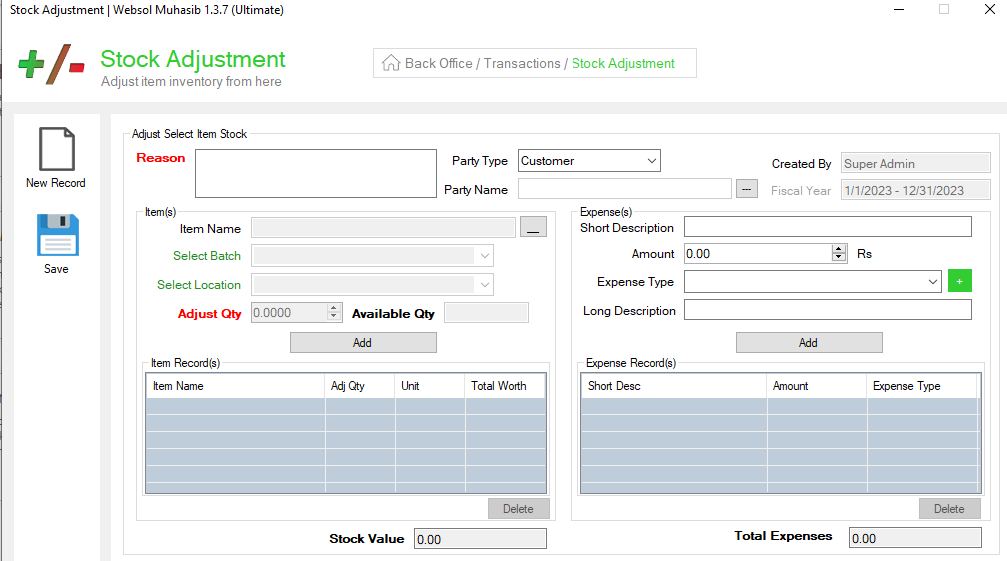
Step 6. In the "Stock Adjustment" window, follow the details given below.
Step 0. Close the Window
