
How to Create a Quotation in Websol Muhasib ERP
Websol Muhasib ERP allows you to create a quotation for the selling items of the company. This will help companies to create a quotation for their customers. This quotation includes the charges, and discounts of your items and also include the total selling price.
Create Quotation
To create a quotation in Muhasib ERP you have to follow the steps given below
Step 1. Log in to the system and access the Main Back Office user interface.
Step 2. On the appeared window, click "Sales and Customers".
step 3. On the appearing "Sales Management" window, the "Transactions" section is shown on your screen.
Step 4. On the "Transaction" section, click on "New Quotation"
Step 5. The "New Quotation" window appears on the screen.
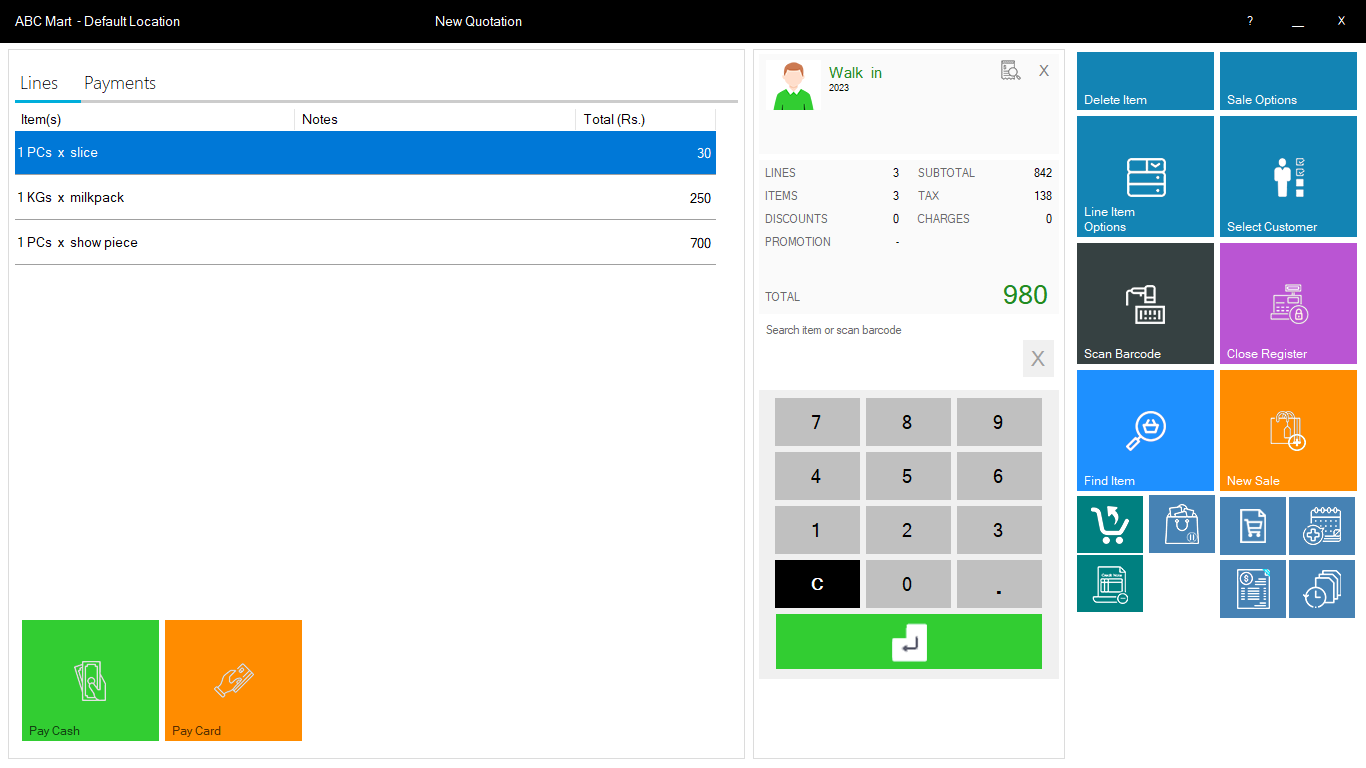
Step 6. In the "New Quotation" screen, Do follow the further steps mentioned below.
Step 7. Look at the Top "Select Customer" label, click it, and select the customer.
Step 8. Select the item from the "Search Item or Scan barcode" search box.
Step 9. And if you didn't remember the item name or barcode then click on "Find Item" and select the item you want to sell.
Step 10. On the left "Line" plane screen, your added items are shown.
Step 11. Click on the line item, The "Modify Line Item" screen is shown on your screen.
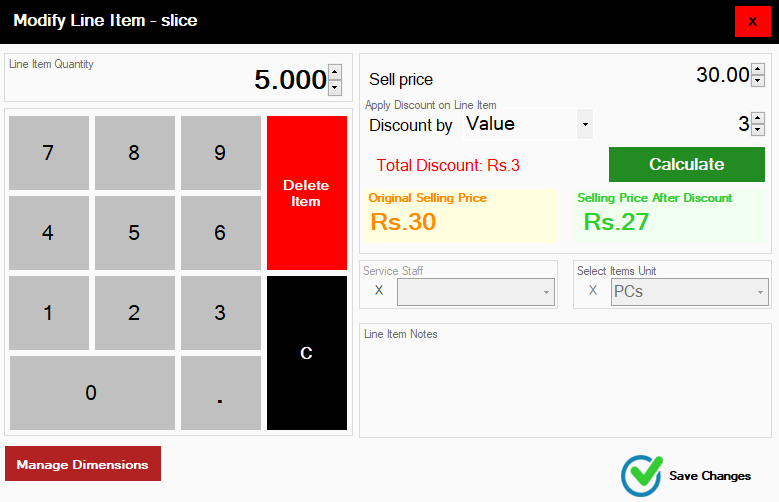
Step 12. You can set the Quantity, change the selling price, and also give the discount on the item in the "Modify Line Item" screen.
Step 13. After modifying an item, click on the "Save Changes"
Step 14. The "New Quotation" screen again shows on the window.
Step 15. On the Top-left, click on the "Payments" section.
Step 16. On the "Payment" section, look at the below buttons and click on the "Print and Save" button.
Step 17. Close the window.
Popular Searches for Create Quotation of Sale in Websol Muhasib ERP
- Muhasib ERP with Sales and customers in Pakistan.
- Muhasib ERP with items quotations reports
- Muhasib ERP with quotation
- ERP software creates a new quotation.
- ERP software creates items quotation.
- How to create new quotations in sales?
- How to send quotations in Muhasib ERP
- How to create item details in Muhasib ERP?
- How to quote product selling details in Muhasib ERP?
- Business in Muhasib ERP.
- Sales in business Muhasib ERP.
- Customers credit in business Muhasib ERP.
- ERP Software in Lahore, Karachi, Islamabad, Peshawar, Quetta, and all over Pakistan with Interactive Sale screens and customers.
- Websol Muhasib ERP is an All-in-One, One-window business management software solution in Karachi, Lahore, Islamabad, and all over Pakistan.
- Which is the best All-in-One, One-window business management software solution in Pakistan? Websol Muhasib ERP
- Muhasib ERP: Best all-in-one business software solution System.
- Muhasib ERP vs Business management solutions.
- Business ERP Karachi: Muhasib ERP.
- Business ERP Lahore: Muhasib ERP.
- Business ERP Islamabad: Muhasib ERP.
- Muhasib ERP with sales management systems.
- Muhasib ERP with integrated inventory management System.
- Muhasib ERP business running Software System.
- Muhasib ERP POS with purchase Management in business.
- Sales order ticket in Muhasib ERP.
- Business Management Software Pakistan
#websol #websoltechnologies #websolerp #muhasiberp #businesserp #businesssoftware #possoftware #cashregister #businessmanagement #erppos #crmsystem #possystem #billingapp #billingsoftware #fbrpos #srbpos #erpsolutions #accountingsoftware #accountingsolutions #erpsolutions #erpaccounting
