
Configure System Settings in Websol Muhasib ERP
Websol Muhasib ERP allows you to Configure your system settings in the software. In these settings, you can customize your software and give permissions for settings with your own will. This was a great and advanced setting that Websol Technologies provides you in the software. This will also help business owners to customize their software to their choice
https://www.youtube.com/watch?v=yC4V62wRbz4&list=PLr15a5Cpksu0LAQ8YHEveBPEaoRIz5CIt&pp=iAQB
Configure System Settings
To set up your System setting here are the steps to follow:
Step 1. Log in to the system and access the Main Back Office user interface.
Step 2. Find the User Profile Button on the left-middle grey strip, and click on the user profile button.
Step 3. User profile windows appear on the screen, click on the "Global Configurations" button.
Step 4. On the appearing "Global Configurations" window, the "System Settings" section is shown on your screen.
Step 5. On the tab bar, click on System Settings.
Step 6. The System settings Section is shown on the window.
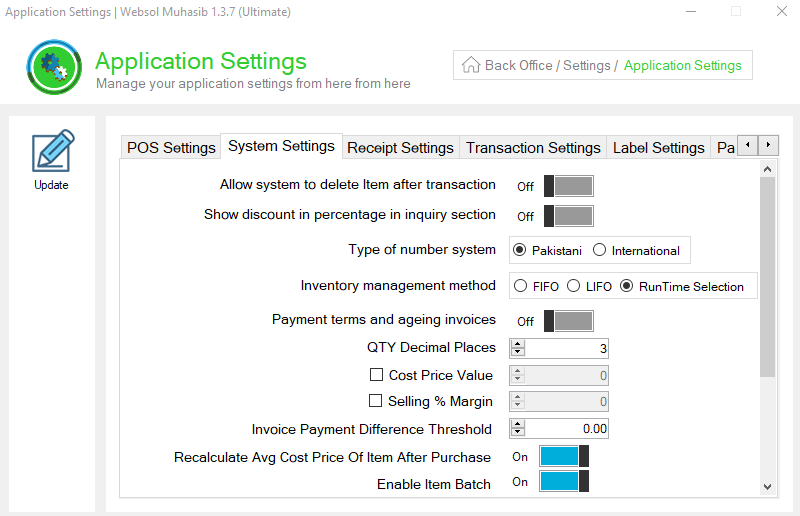
Step 7. On the "System Settings" section, Give the following details.
- Enable / Disable the "Auto generate item's barcode".
- Enable / Disable the "Allow system to delete the item after the transaction".
- Enable / Disable the "Show discount in percentage in the inquiry section".
- Select the "Type of number system" from the choice.
- Select the "Inventory management method" from the choice.
- Enable / Disable the "Payment terms and ageing invoices".
- In the "QTY decimal places" field, enter the number
- Tick mark on the "Cost price value" box, and set the cost price value
- Tick mark on the "Selling % Margin" box, and set the cost price value
- In the "Invoice payment difference threshold" field, set the difference.
- Enable / Disable all the other options.
Step 8. On the left of the window, click on Update Button (a message box appears "System Configuration has been Updated successfully").
Step 9. Close the window.
CALL US NOW!
+92 311 052 0111 | +92 21 3722 1800
PRODUCT DETAILS
https://www.pointofsale.pk/products/muhasib/
Popular Searches for Backup / Restore Data in Websol Muhasib ERP
- Muhasib ERP with system settings in Pakistan.
- Muhasib ERP with settings.
- Muhasib ERP with configured system settings.
- ERP software global configurations
- ERP software setup.
- How to set the decimal values in Muhasib ERP?
- How to set default serviced charges in Muhasib ERP?
- How to set system settings in Muhasib ERP?
- How to set defaults in Muhasib ERP
- Business settings in Muhasib ERP.
- Business POs settings in Muhasib ERP.
- POS screen settings in business Muhasib ERP.
- ERP Software in Lahore, Karachi, Islamabad, Peshawar, Quetta, and all over Pakistan with Interactive Sale screens and customers.
- Websol Muhasib ERP is an All-in-One, One-window business management software solution in Karachi, Lahore, Islamabad, and all over Pakistan.
- Which is the best All-in-One, One-window business management software solution in Pakistan? Websol Muhasib ERP
- Muhasib ERP: Best all-in-one business software solution System.
- Muhasib ERP vs Business management solutions.
- Business ERP Karachi: Muhasib ERP.
- Business ERP Lahore: Muhasib ERP.
- Business ERP Islamabad: Muhasib ERP.
- Muhasib ERP with sales management systems.
- Muhasib ERP with integrated inventory management System.
- Muhasib ERP business running Software System.
- Muhasib ERP POS with purchase Management in business.
- Sales order ticket in Muhasib ERP.
- Business Management Software Pakistan
#websol #websoltechnologies #websolerp #muhasiberp #businesserp #businesssoftware #possoftware #cashregister #businessmanagement #erppos #crmsystem #possystem #billingapp #billingsoftware #fbrpos #srbpos #erpsolutions #accountingsoftware #accountingsolutions #erpsolutions #erpaccounting
