
How to Configure SMS Settings in Muhasib ERP
Websol Muhasib ERP allows you to configure SMS settings. This setting helps the company to send any SMS via notification or sending SMS to a customer & also to set SMS of any transactions performed in the software. This was a great and Advanced tool provided by Websol Technologies.
https://www.youtube.com/watch?v=yC4V62wRbz4&list=PLr15a5Cpksu0LAQ8YHEveBPEaoRIz5CIt&pp=iAQB
SMS settings
To configure the SMS setting, follow the steps given below.
Step 1. Log in to the system and access the Main Back Office user interface.
Step 2. Find the User Profile Button on the left-middle grey strip, and click on the user profile button.
Step 3. User profile windows appear on the screen, click on the "Global Configurations" button.
Step 4. On the appearing "Global Configurations" window, the "POS Settings" section is shown on your screen.
Step 5. On the tab bar, click on SMS Settings.
Step 6. The SMS settings Section is shown in the window.
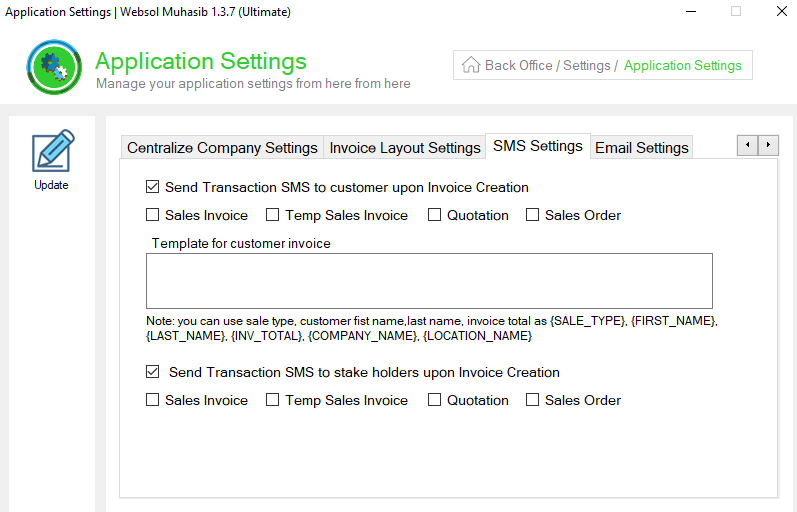
Step 7. In the "SMS Settings" section, follow the details given below.
- If you want to send SMS to customers for any transaction then, Tick mark on the "Send transaction sms to the customer upon invoice creation" box
- After ticking the Box, tick mark on further performed options where you want to send sms to customers (Sales invoice, Temp sales invoice, Quotations, Sales order.)
- You can note any description in "Template for customer invoice".
- If you want to send an SMS to stakeholders of the company for any transaction then, Tick mark on the "Send transaction sms to stakeholders upon invoice creation" box
- After ticking the Box, tick mark on further performed options where you want to send sms to customers (Sales invoice, Temp sales invoice, Quotations, Sales order.)
Step 8. On the left of the window, click on Update Button (a message box appears "System Configuration has been Updated successfully").
Step 9. Close the window.
CALL US NOW!
+92 311 052 0111 | +92 21 3722 1800
PRODUCT DETAILS
https://www.pointofsale.pk/products/muhasib/
Popular Searches for Configure SMS settings in Websol Muhasib ERP
- Muhasib ERP with POS settings in Pakistan.
- Muhasib ERP with SMS settings.
- Muhasib ERP with configured settings.
- ERP software global configurations
- ERP Software Settings
- How to send transaction SMS in Muhasib ERP?
- How to set the template for customer invoices in Muhasib ERP?
- How to set SMS settings in Muhasib ERP?
- How to set the settings of SMS in Muhasib ERP
- Business settings in Muhasib ERP.
- Business POs settings in Muhasib ERP.
- POS screen settings in business Muhasib ERP.
- ERP Software in Lahore, Karachi, Islamabad, Peshawar, Quetta, and all over Pakistan with Interactive Sale screens and customers.
- Websol Muhasib ERP is an All-in-One, One-window business management software solution in Karachi, Lahore, Islamabad, and all over Pakistan.
- Which is the best All-in-One, One-window business management software solution in Pakistan? Websol Muhasib ERP
- Muhasib ERP: Best all-in-one business software solution System.
- Muhasib ERP vs Business management solutions.
- Business ERP Karachi: Muhasib ERP.
- Business ERP Lahore: Muhasib ERP.
- Business ERP Islamabad: Muhasib ERP.
- Muhasib ERP with sales management systems.
- Muhasib ERP with integrated inventory management System.
- Muhasib ERP business running Software System.
- Muhasib ERP POS with purchase Management in business.
- Sales order ticket in Muhasib ERP.
- Business Management Software Pakistan
#websol #websoltechnologies #websolerp #muhasiberp #businesserp #businesssoftware #possoftware #cashregister #businessmanagement #erppos #crmsystem #possystem #billingapp #billingsoftware #fbrpos #srbpos #erpsolutions #accountingsoftware #accountingsolutions #erpsolutions #erpaccounting
